OSM Restaurants
François Pacull · · mis à jour le 24 mai 2018
In this post we are simply going to retrieve the restaurants from the city of Lyon-France from Open Street Map, and then plot them with Bokeh.
Downloading the restaurants name and coordinates is done using a fork of the great OSMnx library. The OSM-POI feature of this fork will probably soon be added to OSMnx from what I understand (issue).
First we create a fresh conda env, install jupyterlab, bokeh (the following lines show the Linux way to do it but a similar thing could be done with Windows):
$ conda create -n restaurants python=3.6
$ source activate restaurants
$ conda install jupyterlab
$ conda install -c bokeh bokeh
$ jupyter labextension install jupyterlab_bokeh
$ jupyter lab osm_restaurants.ipynb
The jupyterlab extension allows the rendering of JS Bokeh content.
Then we need to install the POI fork of OSMnx:
$ git clone git@github.com:HTenkanen/osmnx.git
$ cd osmnx/
osmnx $  git checkout 1-osm-poi-dev
osmnx $  pip install .
osmnx $  cd ..
And we are ready to run the notebook:
jupyter lab osm_restaurants.ipynbDownload OSM restaurants
import osmnx as ox
place = "Lyon, France"
restaurant_amenities = ['restaurant', 'cafe', 'fast_food']
restaurants = ox.pois_from_place(place=place,
                                 amenities=restaurant_amenities)[['geometry',
                                                                  'name',
                                                                  'amenity',
                                                                  'cuisine',
                                                                  'element_type']]
We are looking for 3 kinds of amenity related to food: restaurants, cafés and fast-foods. The collected data is returned as a geodataframe, which is basically a Pandas dataframe associated with a geoserie of Shapely geometries. Along with the geometry, we are only keeping 4 columns:
- restaurant name,
- amenity type (restaurant, café or fast_food),
- cuisine type and
- element_type (OSM types: node, way relation).
restaurants.head()| geometry | name | amenity | cuisine | element_type | |
|---|---|---|---|---|---|
| 25733699 | POINT (4.8634608 45.7439964) | Le Petit Comptoir | restaurant | international | node |
| 25733700 | POINT (4.8689407 45.7410332) | L’Esprit Bistro | restaurant | NaN | node |
| 26641424 | POINT (4.8346121 45.7569848) | Comptoir des Marronniers | restaurant | NaN | node |
| 33065934 | POINT (4.7732746 45.7393443) | Auberge de la Vallée | restaurant | NaN | node |
| 35694312 | POINT (4.8342288 45.7581985) | McDonald’s | fast_food | burger | node |
ax = restaurants.plot()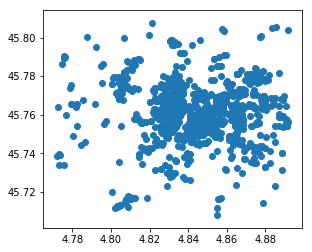
Update POI’s geometry type
A large majority of the restaurants corresponds to OSM nodes that are translated to shapely Points:
restaurants['element_type'].value_counts()node 1609
way 43
relation 2
Name: element_type, dtype: int64restaurants[restaurants.element_type=='node']['geometry'].map(type).head()25733699 <class 'shapely.geometry.point.Point'>
25733700 <class 'shapely.geometry.point.Point'>
26641424 <class 'shapely.geometry.point.Point'>
33065934 <class 'shapely.geometry.point.Point'>
35694312 <class 'shapely.geometry.point.Point'>
Name: geometry, dtype: objectHowever, OSM ways appear as shapely polygons:
restaurants[restaurants.element_type=='way']['geometry'].iat[0]restaurants[restaurants.element_type=='way']['geometry'].map(type).head()37801104 <class 'shapely.geometry.polygon.Polygon'>
40555792 <class 'shapely.geometry.polygon.Polygon'>
40555793 <class 'shapely.geometry.polygon.Polygon'>
43013914 <class 'shapely.geometry.polygon.Polygon'>
44505425 <class 'shapely.geometry.polygon.Polygon'>
Name: geometry, dtype: objectWhile OSM relation appears as shapely multipolygons:
restaurants[restaurants.element_type=='relation']['geometry'].iat[0]restaurants[restaurants.element_type=='relation']['geometry'].map(type).head()1708967 <class 'shapely.geometry.multipolygon.MultiPol...
2655433 <class 'shapely.geometry.multipolygon.MultiPol...
Name: geometry, dtype: objectUsing the shapely centroid method, we are going to get a point geometry for all polygon or multipolygon entries:
from shapely.geometry import Polygon, MultiPolygon
for item in ['way', 'relation']:
    restaurants.loc[restaurants.element_type==item, 'geometry'] = \
restaurants[restaurants.element_type==item]['geometry'].map(lambda x: x.centroid)restaurants['geometry_type'] = restaurants.geometry.map(type)
restaurants['geometry_type'].value_counts()<class 'shapely.geometry.point.Point'> 1654
Name: geometry_type, dtype: int64Plot the POIs with Bokeh
All restaurants may not have a name. Since we are going to plot all restaurants along with their name, we replace missing names by empty strings (we actually do the same for the cuisine type):
restaurants.name.fillna('', inplace=True)
restaurants.cuisine.fillna('?', inplace=True)
Also, we reproject the geometric data to WGS 84 / Pseudo-Mercator in order to be compatible with tile providers:
restaurants = restaurants.to_crs(epsg=3857)And we are now ready to plot the restaurants on a map.
from bokeh.io import output_notebook
from bokeh.plotting import figure, show
from bokeh.models import (
    ColumnDataSource,
    HoverTool,
    WheelZoomTool)
from bokeh.tile_providers import CARTODBPOSITRON_RETINA

source = ColumnDataSource(data=dict(
    x=restaurants.geometry.x,
    y=restaurants.geometry.y,
    name=restaurants.name.values,
    cuisine=restaurants.cuisine.values))

TOOLS = "pan,wheel_zoom,hover,reset"
p = figure(title="Lyon OSM restaurants", tools=TOOLS,
           match_aspect=True, x_axis_location=None, y_axis_location=None,
           active_scroll='wheel_zoom')
p.grid.grid_line_color = None
p.add_tile(CARTODBPOSITRON_RETINA)
p.circle(x='x', y='y', source=source, fill_alpha=0.6, size=6)

hover = p.select_one(HoverTool)
hover.point_policy = "snap_to_data"
hover.tooltips = [
    ("Name", "@name"),
    ("Cuisine", "@cuisine"),
]

output_notebook()
show(p)